Place your first structure
Outcome
Create a reusable structure and its visual in Unity, connect them to the board, then preview and
place one instance at (1, 1).
The assets define what the structure is and how it looks. The component at the end of this page only asks the board to place that authored definition.
Steps
1. Author the structure
- Exit Play Mode and select
Assets/FirstBoardin the Project window. - Choose Assets > Create > Lost Lily > Grid Toolkit > Structures > Square Basic Structure.
Name the new SquareGridBasicStructureAsset
First Board Crate. - Set Structure Id to
first-board.crateand Display Name toCrate. Keep the default one-cell footprint, then select Validate Structure.
first-board.crate identifies the reusable structure definition. The placed instance will receive
the separate ID first-board.crate-1.
2. Give it a visual
- Create a Cube in the Scene, name it
First Board Crate Prefab, and scale it so it fits within one cell. Drag it intoAssets/FirstBoardto create a prefab, then remove the scene copy. - Choose Assets > Create > Lost Lily > Grid Toolkit > Visualization > Structure Prefab Visual.
Name the GridStructurePrefabVisualAsset
First Board Crate Visual. - Assign the crate prefab to Prefab, then select Prepare Prefab for Grid Toolkit.
- Select
First Board Crateand assignFirst Board Crate Visualto Visual Asset.
The structure asset owns gameplay data such as footprint and layer. The visual asset points to the prefab used by the renderer.
3. Connect the structure to the board and renderer
- Choose Assets > Create > Lost Lily > Grid Toolkit > Structures > Structure Library and name
the GridStructureLibraryAsset
First Board Structure Library. - Add
First Board Crateto its Structures list, then select Validate Library. - Select
First Board Setup, assignFirst Board Structure Libraryto Structure Library, and select Validate Setup. - Select the
First Boardscene object and add GridStructureLibraryNodeBuilder. AssignFirst Board Structure Libraryto it. - On the World 3D renderer, replace Structure Node Builder with the new library node builder.
The setup uses the library to build and resolve structure definitions. The node builder uses the same library to find each structure's authored visual.
4. Preview and place an instance
- Create
Assets/FirstBoard/FirstBoardActionExample.cs. - Expand Complete tested example, copy the component into that file, and save it.
Complete tested example
using LostLily.GridToolkit.Actions;
using LostLily.GridToolkit.Authoring;
using LostLily.GridToolkit.Board;
using LostLily.GridToolkit.Occupancy;
using LostLily.GridToolkit.Topology.Square;
using UnityEngine;

namespace GridToolkit.Tutorials
{
    [RequireComponent(typeof(GridBoardAuthoring))]
    public sealed class FirstBoardActionExample : MonoBehaviour
    {
        // A definition can be shared; each placed instance needs its own ID.
        private const string DefinitionId = "first-board.crate";
        private const string InstanceId = "first-board.crate-1";

        [SerializeField] private GridBoardAuthoring boardAuthoring;
        [SerializeField] private Vector2Int placementCell = new(1, 1);

        private void Start()
        {
            PlaceFromButton();
        }

        public void PlaceFromButton()
        {
            Place();
        }

        public GridActionResult Place()
        {
            if (boardAuthoring == null)
                boardAuthoring = GetComponent<GridBoardAuthoring>();
            GridBoardState state = boardAuthoring.State;

            if (state == null || state.IsDisposed)
            {
                Debug.LogError("Build the authored board before placing a structure.", this);
                return null;
            }

            GridStructureLibraryAsset library = boardAuthoring.SetupAsset?.StructureLibrary;
            GridStructureDefinition definition = null;
            if (library == null || !library.TryGetStructureDefinition(DefinitionId, out definition))
            {
                Debug.LogError($"Add '{DefinitionId}' to the board setup's structure library.", this);
                return null;
            }

            SquareGridCoordinate coordinate = new(placementCell.x, placementCell.y);
            IGridAction action = GridActions.PlaceStructure(definition, coordinate, InstanceId);

            // Preview checks the request without changing the board.
            GridActionResult preview = GridActionRunner.Preview(state, action);
            if (!preview.Success)
            {
                Debug.LogError(preview.FormatDiagnostics(), this);
                return preview;
            }

            // Apply checks the current state again and commits an accepted placement.
            GridActionResult applied = GridActionRunner.Apply(state, action);
            if (!applied.Success)
            {
                Debug.LogError(applied.FormatDiagnostics(), this);
                return applied;
            }

            Debug.Log($"Placed {InstanceId}. Board revision {state.Revision}.", this);
            return applied;
        }
    }
}
- Add First Board Action Example to the
First BoardGameObject beside GridBoardAuthoring. - Enter Play Mode with the Scene view visible.
How the component works
Place() follows one workflow: resolve the current board, find the definition, create the request,
preview it, and apply it. Each rejected result logs diagnostics and stops. Start calls that method
through PlaceFromButton; you can remove Start and connect the callback to your own button.
The component first resolves the authored state on the same GameObject:
Excerpt — resolve the authored board state. Tested using public APIs.
if (boardAuthoring == null)
    boardAuthoring = GetComponent<GridBoardAuthoring>();
GridBoardState state = boardAuthoring.State;
It resolves first-board.crate from the structure library assigned to the setup:
Excerpt — resolve the authored structure definition. Tested using public APIs.
GridStructureLibraryAsset library = boardAuthoring.SetupAsset?.StructureLibrary;
GridStructureDefinition definition = null;
if (library == null || !library.TryGetStructureDefinition(DefinitionId, out definition))
{
    Debug.LogError($"Add '{DefinitionId}' to the board setup's structure library.", this);
    return null;
}
It then creates one placement request with that definition:
Excerpt — create the placement request. Tested using public APIs.
SquareGridCoordinate coordinate = new(placementCell.x, placementCell.y);
IGridAction action = GridActions.PlaceStructure(definition, coordinate, InstanceId);
Preview checks the request without changing the board. The complete component reports diagnostics and stops when this result is unsuccessful:
Excerpt — preview the placement. Tested using public APIs.
// Preview checks the request without changing the board.
GridActionResult preview = GridActionRunner.Preview(state, action);
if (!preview.Success)
{
    Debug.LogError(preview.FormatDiagnostics(), this);
    return preview;
}
Only an accepted request reaches Apply:
Excerpt — apply the placement. Tested using public APIs.
// Apply checks the current state again and commits an accepted placement.
GridActionResult applied = GridActionRunner.Apply(state, action);
if (!applied.Success)
{
    Debug.LogError(applied.FormatDiagnostics(), this);
    return applied;
}
GridActionRunner evaluates Preview and Apply separately. Preview never writes to the board. Apply checks the current board again, then commits the complete placement or leaves the board unchanged. The view refreshes after a commit.
What you should see
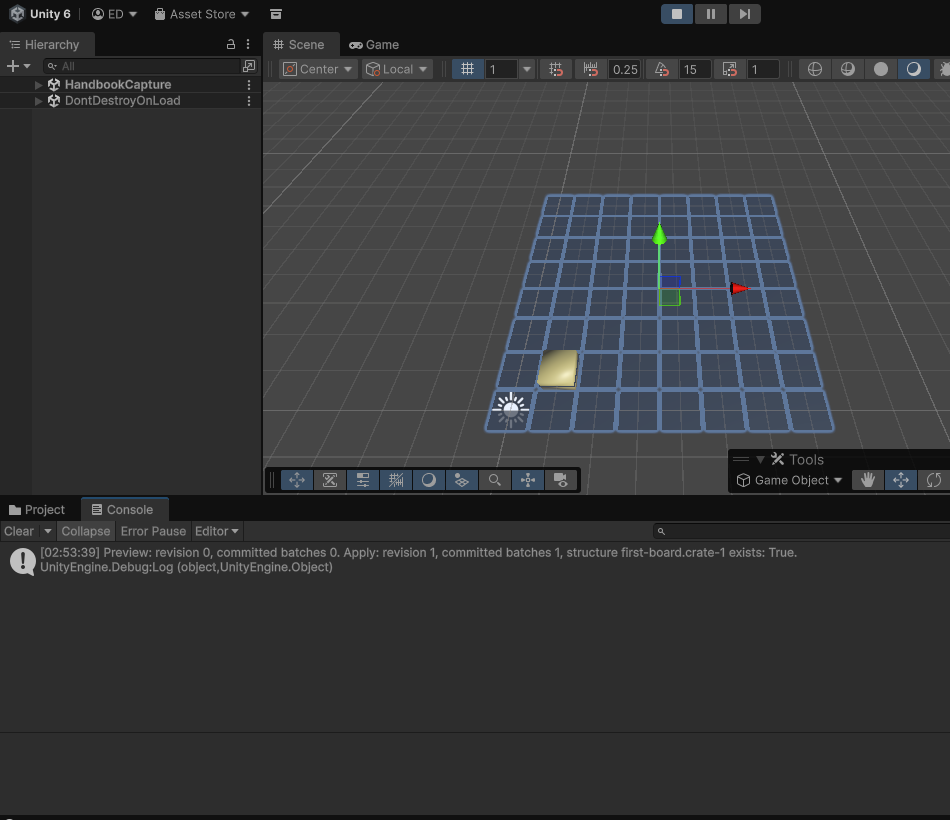
The Console reports:
Placed first-board.crate-1. Board revision 1.
The structure appears at (1, 1), and the live
GridBoardState advances from revision 0 to 1.
Preview leaves the board unchanged; applying the accepted action publishes one committed batch.
The regression tests check revision and event counts separately from this teaching component.
Troubleshooting
| Symptom | Check |
|---|---|
| “Build the authored board before placing a structure” | Keep the example beside GridBoardAuthoring; assign the setup and enable Build On Awake. |
| The structure definition cannot be found | Add First Board Crate to the library and assign that library to First Board Setup. |
| Preview reports an invalid coordinate | Confirm the board is still 8 by 8 and the request uses (1, 1). |
| Placement reports a duplicate instance ID | Stop and re-enter Play Mode, or remove first-board.crate-1. |
| The structure exists but is not visible | Assign the prefab visual to the structure, assign the library to GridStructureLibraryNodeBuilder, and use that builder in the renderer. |
| The prefab reports invalid configuration | Select Prepare Prefab for Grid Toolkit on the prefab visual asset. |